How to Install IPTV Smarters on iPhone/iPad 2026
Step-by-Step Guide: How to Install IPTV Smarters on iPhone & iPad (2026)
Welcome to the most comprehensive, step-by-step guide on installing IPTV Smarters on your iPhone or iPad. While many users enjoy IPTV Smarters Pro on devices like the Firestick or Android TV/Google TV, Apple users have a dedicated, optimized version available directly from the Apple App Store. This guide will walk you through the entire process, ensuring you’re streaming your favorite content in minutes.
In this updated 2026 guide, we’ll cover everything from finding the correct app to logging in for the first time. Let’s get started!
Why Choose IPTV Smarters for iOS?
IPTV Smarters has become a leading name in the streaming world, and its iOS application, “Smarters Player Lite,” is no exception. It’s designed to provide a seamless and intuitive experience on your Apple devices. Here’s why millions prefer it:
- User-Friendly Interface: The app is tailored for touchscreens, making navigation on iPhones and iPads incredibly smooth.
- High-Quality Streaming: Supports HD and 4K streaming, provided your IPTV subscription supports it.
- Feature-Rich: Includes an Electronic Program Guide (EPG), parental controls, and the ability to add multiple playlists or files.
- Reliable & Updated: Regularly updated by developers to ensure compatibility with the latest iOS versions.
Step-by-Step Installation Guide for iPhone & iPad
Follow these simple steps to get IPTV Smarters (Smarters Player Lite) installed on your device.
Step 1: Find the App on the App Store
First, unlock your iPhone or iPad and open the App Store. Tap on the search tab at the bottom and type in “IPTV Smarters“. Look for the app named “Smarters Player Lite“. It’s important to select the correct one, as it’s the official version for iOS.

Step 2: Download and Install the App
Once you’ve found “Smarters Player Lite,” tap the Get button next to it. You may be prompted to authenticate the download using Face ID, Touch ID, or your Apple ID password. After authentication, the app will begin downloading and installing on your home screen. Tap Install to confirm.

Step 3: Launch the App and Log In
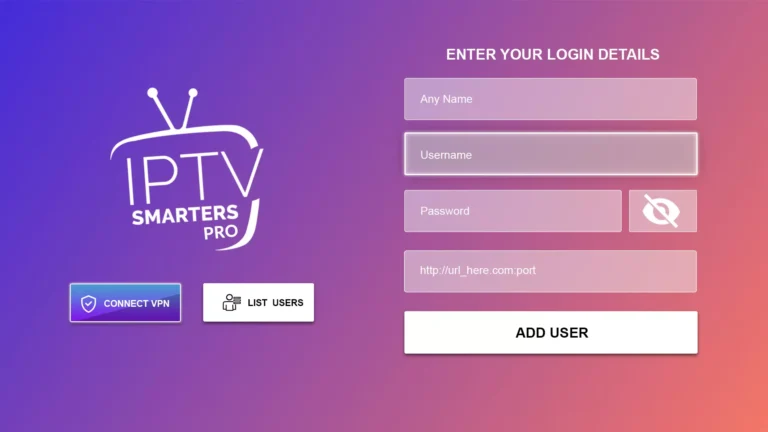
After installation, tap Open directly from the App Store, or find the new “Smarters Player Lite” icon on your home screen and tap it. The first time you launch the app, you’ll be greeted with the login screen. This is where you’ll enter the details provided by your IPTV service provider.

Step 4: Enter Your Credentials and Start Streaming
You will typically have three options to log in: Login with Xtream Codes API (most common), Login with URL (for M3U playlists), or Upload Playlist File. Select the method your provider uses, enter the required details (Server URL, Username, and Password), and tap “Login“. After a successful connection, you’ll have access to all your subscribed content, including live TV, movies, and series. Enjoy!
Comparison: IPTV Smarters Lite vs. Other iOS Players
Wondering how Smarters Player Lite stacks up against the competition? Here’s a quick comparison to help you understand its value.
| Feature | Smarters Player Lite | Other Free Players |
|---|---|---|
| Cost | Free | Often Free (with ads) or Paid |
| EPG Support | ✅ Excellent & Detailed | ⚠️ Basic or Unavailable |
| Parental Controls | ✅ Yes | ❌ Rarely Included |
| Multiple Playlists | ✅ Yes | ⚠️ Limited or No |
| User Interface | Modern & Intuitive | Often Outdated |
Troubleshooting Common Installation Issues
Sometimes things don’t go as planned. Here are solutions to a few common problems users face:
- App Not Found: Ensure you’re searching for “Smarters Player Lite” and have a stable internet connection.
- Login Failed: Double-check your credentials with your IPTV provider. Ensure the server URL doesn’t have typos (e.g., ‘http://’ vs ‘https://’).
- Buffering/Lag: This is often related to your internet speed or the IPTV server. Try a wired connection or lower the streaming quality in the app’s settings.
Frequently Asked Questions (FAQ)
Is IPTV Smarters free on iPhone?
Yes, the “Smarters Player Lite” app is completely free to download and use. However, you will need an active subscription from an IPTV service provider to stream content.
What is the difference between IPTV Smarters Pro and Smarters Player Lite?
IPTV Smarters Pro is typically designed for Android devices, while Smarters Player Lite is the official version built specifically for iOS (iPhone and iPad). They share a very similar feature set and user experience, but Lite is optimized for Apple’s operating system.
Can I use my IPTV credentials from another app?
Absolutely. If you have a subscription with an IPTV provider, your login credentials (Username, Password, and Server URL) will work in any compatible app, including Smarters Player Lite.
Conclusion
Installing IPTV Smarters on your iPhone or iPad is a straightforward process that opens up a world of entertainment. By following this guide, you can transform your Apple device into a powerful streaming hub. Download the app, enter your details, and start enjoying your favorite content on the go.
Note: This guide is for educational purposes regarding the installation of the application. Ensure you have the rights to stream any content you access.