
How to Install IPTV Smarters Pro on Firestick, Android TV, iOS & More
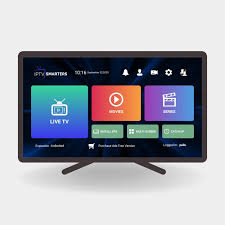
IPTV Smarters Pro is one of the most reliable and user-friendly IPTV players available today. It’s completely free, highly compatible with multiple devices, and packed with advanced streaming features — making it a favorite among IPTV users worldwide.
Unlike other IPTV players that require paid subscriptions, IPTV Smarters Pro can be used at no cost. This accessibility has helped it remain one of the most downloaded IPTV apps across different platforms for years.
The app is constantly updated by its developers to ensure smooth performance and compatibility with the latest streaming devices. As of now, the latest version (v3.1.5) offers an improved interface and better stability for users.
⚠️ Important: The IPTV Smarters Pro app itself doesn’t host live TV channels or movies.
To stream content, you’ll need to add your IPTV provider’s M3U playlist or Xtream Codes API login details.
Since IPTV Smarters Pro was removed from the Google Play Store in 2019 and isn’t available in the Amazon Appstore, users need to side-load it manually. The installation process is simple and can be done in just a few minutes.
Currently, IPTV Smarters Pro is compatible with a wide range of devices, including:
🔸 Amazon Firestick / Fire TV
🔸 Android & Google TV Boxes
🔸 iOS Devices (iPhone, iPad)
🔸 Windows PCs
🔸 Android Smartphones & Tablets
With its powerful features and cross-platform support, IPTV Smarters Pro remains one of the best ways to stream live TV, movies, and series with your favorite IPTV service
🎥 Get Started with IPTV Smarters Pro — Free Bonus Guide
IPTV Smarters Pro remains one of the most
- 100% Free
- Accepts M3U URLs, Xtream Codes, & Local Files
- Working EPG (Electronic Program Guide)
- Multiple Playlist Capabilities
- Advanced Settings
- Recording Capabilities
- Parental Controls
- and more
We go into detail of the features listed above and much more so make sure you read below the installation guide to see how you can make the most out of this media application.
How to Install IPTV Smarters Pro on Firestick & Google/Android TV
NOTE: We are using a Fire TV Stick 4K Max in the screenshots below. However, this exact method will also work on Google/Android TV Boxes as well as any variation of Firestick or Fire TV as well as popular Smart TVs.
1. You must first install the Downloader app on your device. If you haven’t done this, refer to our tutorial below.
trusted IPTV players for streaming live TV, movies, and VOD content.
It’s the perfect solution for anyone who already has an IPTV subscription but needs a powerful and easy-to-use app to access their content.
If you’re just starting in the IPTV world, you may have heard of Smarters Pro but are unsure how it works. Let’s break it down 👇
🔹 What is IPTV Smarters Pro?
IPTV Smarters Pro is an advanced IPTV player that allows subscribers to integrate their IPTV service and enjoy their entire library — including live TV channels, movies, and on-demand shows — all from one clean interface.
Most IPTV providers don’t offer their own dedicated streaming apps. That’s where IPTV Smarters Pro becomes essential — it works as your central hub to stream everything easily.
When you subscribe to an IPTV service, you usually receive a special M3U URL or Xtream Codes API login. You can simply enter those details into Smarters Pro and start streaming instantly.
If you want a full setup tutorial, check our official guide:
👉
 Access Code: 5909750
 Download TereaTV app
 🌟 Key Features of IPTV Smarters Pro
Here are some of the best features that make IPTV Smarters Pro a top-rated choice among IPTV users:
✅ Easy integration with M3U and Xtream Codes
🎬 Supports Live TV, Movies, and Series
🕒 Built-in EPG (Electronic Program Guide)
💾 Catch-up & Multi-screen Support
📱 Works on Firestick, Android TV, iOS, Windows, and more
🎨 Clean and user-friendly interface
🔐 Compatible with VPNs for secure streaming
🔒 Bonus Tip: Get a VPN for Safer IPTV Streaming
To protect your privacy while streaming, we recommend using a secure VPN.
👉 Get Surfshark VPN Discount + Extra Months Free for safe, buffer-free IPTV viewing.
Conclusion:
If you’re looking for a simple yet powerful player to manage your IPTV channels, IPTV Smarters Pro is the best starting point.
It’s free, flexible, and compatible with almost every device you own.

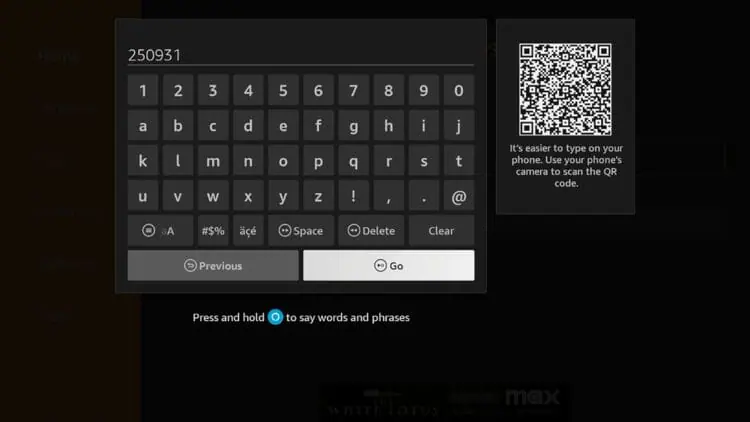
2. Launch Downloader and place your cursor in the URL box and click the OK button on your remote to open the keyboard.

3. Now, type 250931 and click Go. This is the official code for the TROYPOINT Toolbox.
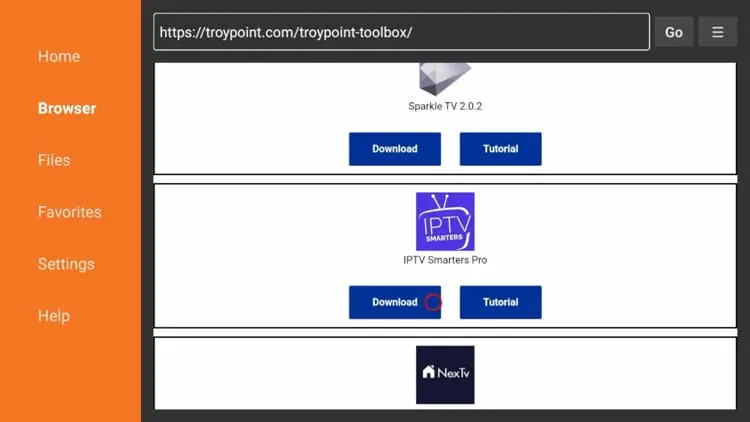
4. You are now presented with the home screen of the TROYPOINT Toolbox.

5. Scroll down to find IPTV Smarters Pro and click Download.
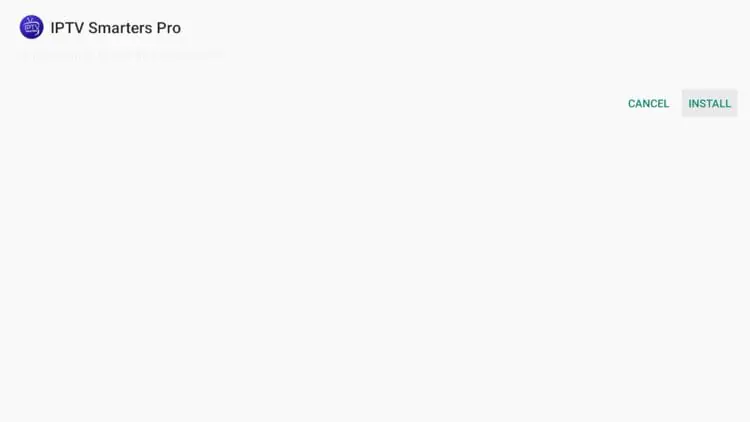
6. Wait for the app to download and click Install.
7. Then click Done.

8. You are then prompted to delete the installation file. This will free up space on your device. Click Delete.

9. Choose Delete again.

10. Installation is now complete. You can find IPTV Smarters Pro in your applications list.

Continue reading for more info on this application and other install guides for various devices.
How to Setup IPTV Smarters Pro
After installing, you may launch the application for use. First, you are prompted to select your layout.
- If using a streaming device such as a Firestick or Android TV/Google TV box, select TV and click SAVE.

- Make sure to read the new announcement from Smarters Pro noting that they do not provide any playlists or content and click Accept.

- Choose Login with Xtream Codes API
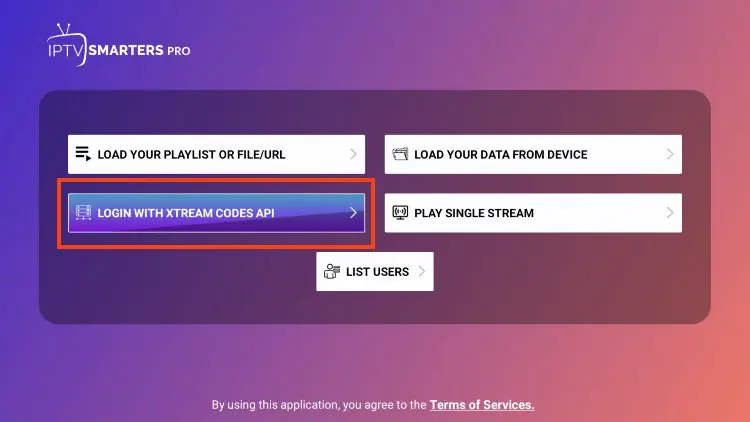
- Or if your IPTV Provider does not provide Xtream Codes setup, you can use an M3U URL and choose to Load Your Playlist or File URL.
- Most M3U URLs require that you input your service username and password. You will usually see where these go inside the URL as they are indicated by “username=xxxx” & password=xxxx”. You will input your username and password where the x’s are located.

- Because these M3U URLs are so long to type, we recommend using Xtream Code if possible which is what we show in the screenshots below.
- Enter account information and click Add User.
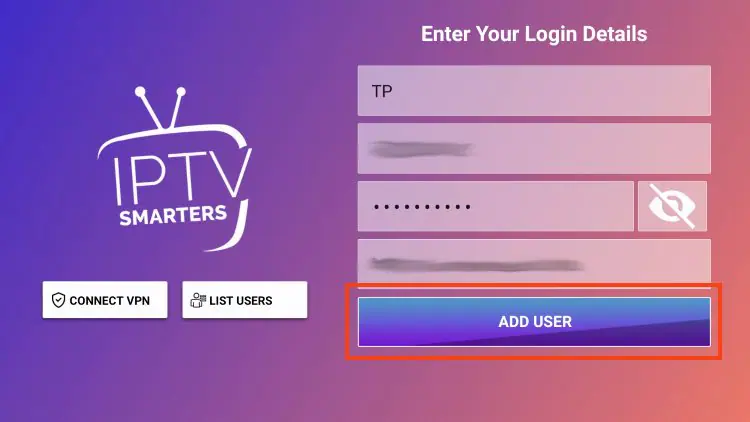
- Wait for User added successfully message to appear.